GoHighLevel Stripe integration: how to connect it and take payments
The GoHighLevel Stripe integration connects your Stripe account to a HighLevel sub-account, so you can take card payments on order forms, invoices, payment links, subscriptions and calendar bookings, and every payment lands on the contact’s record. You connect it under Payments > Integrations in a few minutes. What decides whether it works is the groundwork: the right Stripe account, live mode, your products set up properly and automations that react to each payment.
Key takeaways
- Connect Stripe in the sub-account under Payments > Integrations. Each sub-account takes one Stripe account at a time.
- Run a test payment in test mode, then switch to live before launch. Payment methods are set separately for each mode.
- Once connected, Stripe works across order forms, invoices, payment links, subscriptions, text-to-pay and paid calendar bookings.
- Payments taken directly in Stripe before you connected aren’t imported. Only new payments created through HighLevel are tracked.
- Use the Payment Received trigger to send receipts and next steps, and its failed-status filter to chase failed payments.
- Stripe’s US rate is 2.9% plus 30 cents per domestic card payment.
What does the Stripe integration do in GoHighLevel?
It lets HighLevel charge your customers through your own Stripe account. The money goes to Stripe and then to your bank, as it would with any Stripe checkout. What changes is that the payment is tied to a contact in the CRM: the order, the invoice or the booking sits on their record, and a workflow can react to it straight away.
That’s the real reason to connect Stripe inside GoHighLevel rather than sending people a payment link from Stripe’s own dashboard. A payment made in GoHighLevel can move a deal in the pipeline, send a welcome sequence, tag the buyer or give them course access. A payment made in Stripe alone does none of that.
At Wall Street Edge Advisory, a $99 assessment takes payment through Stripe, then scores the prospect, sends an automated report and routes qualified prospects to a call, all in one GoHighLevel account. That build isn’t unusual. Most of the GoHighLevel accounts we build take payments, and Stripe is connected on nearly all of them, including School Solutions, RS Five and Home Moovers.
How do you connect Stripe to GoHighLevel, step by step?
(checked on help.gohighlevel.com)- Open the sub-account for the business that’s taking the payments, not the agency view.
- Go to Payments, then Integrations.
- Click Connect on Stripe. You’re sent to Stripe.
- Log in to the Stripe account you want to use, or create one. Check it’s the right business before you go on: the Stripe account decides whose bank the money lands in.
- Authorize HighLevel. You need enough permissions in Stripe to do this. If the button fails, the Stripe account owner may need to raise your role.
- Check it’s connected. Back on Payments > Integrations, Stripe should show as connected.
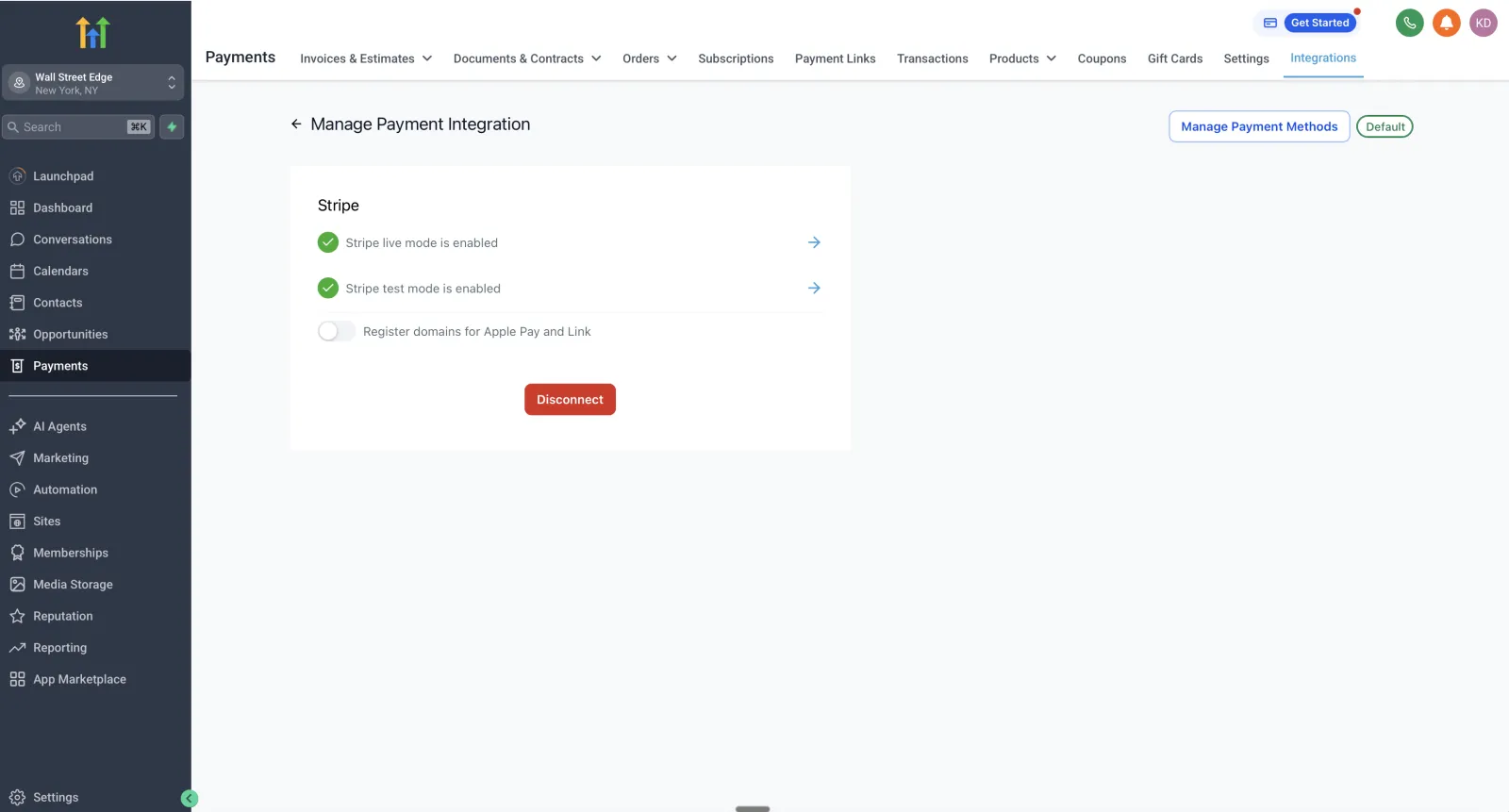
- Click Manage to choose which payment methods to offer, such as cards, Apple Pay, Google Pay or ACH, where your account supports them.
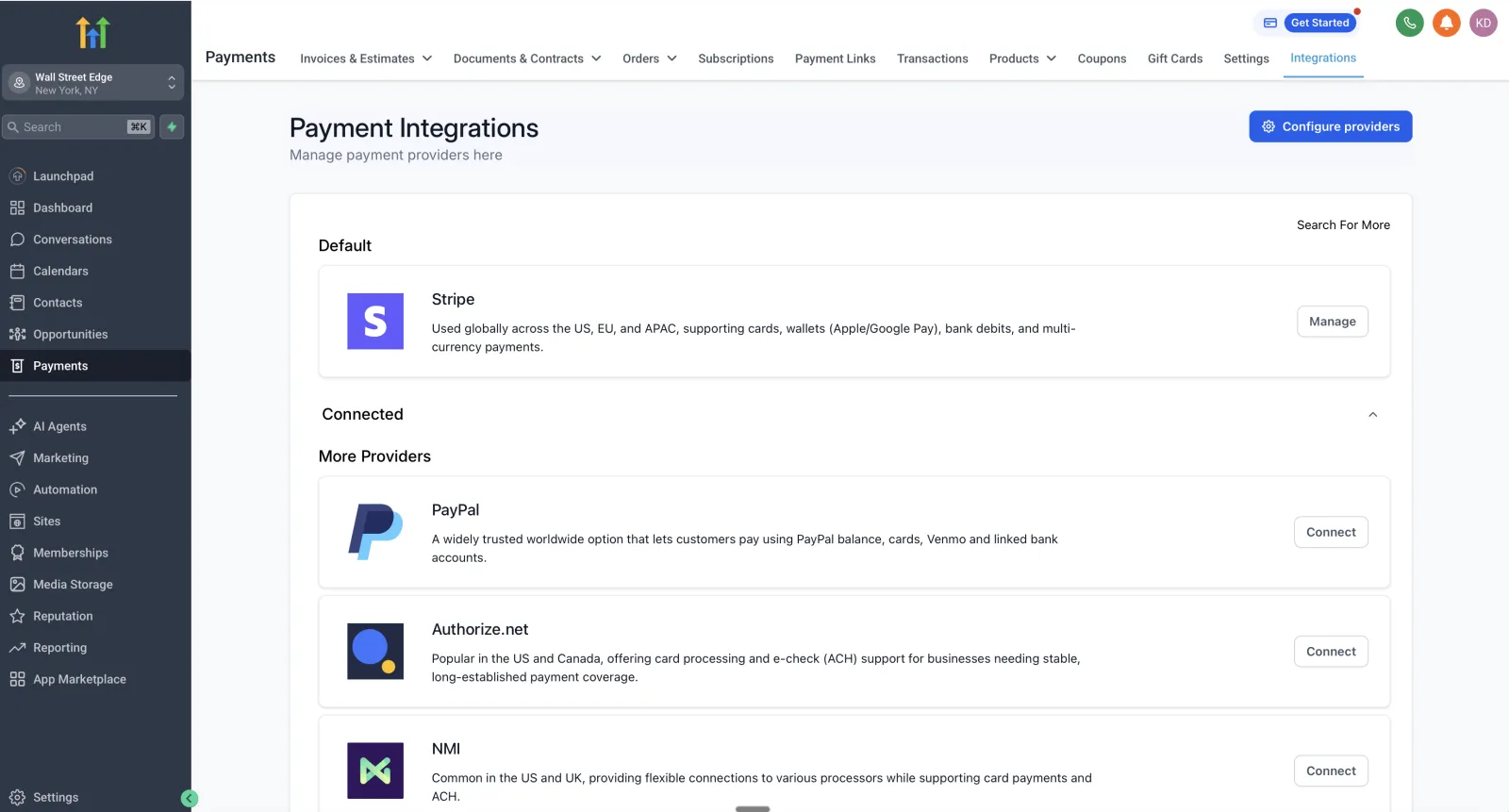
Before connecting, make sure Stripe is available in your country and your Stripe account is fully verified. An account that’s still under review can connect and then fail to pay out.
Test mode vs live mode
Stripe has two environments. Test mode simulates payments with test card numbers, so nothing is charged. Live mode charges real cards.
Use test mode to run every checkout once before launch: the order form, the invoice, the paid booking. Check the payment shows on the contact and the workflow fires. Then switch to live.
Two things trip people up here:
- Payment methods are set separately for test and live. Turning Apple Pay on in test mode doesn’t turn it on in live.
- Leaving test mode on. Customers see a checkout that looks fine, nothing gets charged and nobody notices until the money doesn’t arrive. Check the mode before any launch.
Click Manage on Stripe to see both modes. On a working account, live mode and test mode both show as enabled, and the same screen has the switch that registers your domains for Apple Pay and Link.
Can you connect more than one Stripe account?
Not in one sub-account. Each sub-account connects to one Stripe account at a time. A business that runs two brands with separate Stripe accounts needs two sub-accounts, one per brand.
There’s also a difference between the agency’s Stripe and the sub-account’s Stripe. The sub-account’s Stripe is the business taking payments from its own customers. The agency’s Stripe is used by an agency to bill its clients, for example rebilling usage or charging for software in SaaS mode. If you run a single business on HighLevel, you only need the sub-account connection.
What can you sell once Stripe is connected?
Stripe works in more places in HighLevel than any other processor (checked on help.gohighlevel.com). Once it’s connected you can take payments through:
- Order forms and funnels. A checkout step on a funnel page, with order bumps and upsells.
- Forms and surveys with a payment field.
- Invoices and recurring invoices, sent by email or text.
- Payment links, for a product or a custom amount.
- Text-to-pay. From a contact’s conversation, the Request Payment button sends a payment link by text. It needs at least one active product (checked on help.gohighlevel.com).
- Subscriptions, for memberships, retainers and payment plans.
- Paid calendar bookings, so a deposit or a fee is paid when someone books.
- Courses and communities, for paid access.
- The online store and point of sale.
Set your products up in HighLevel under Payments > Products. Recurring products can be imported from Stripe; one-time products are created in HighLevel.
Stripe vs other payment processors in GoHighLevel
HighLevel supports Stripe, PayPal, Square, Authorize.Net, NMI and Razorpay (checked on help.gohighlevel.com). Support differs by feature, so check HighLevel’s table for the exact places you need before choosing one.
| Processor | Best for | Watch out for |
|---|---|---|
| Stripe | Most businesses: the widest support across checkouts, invoices, subscriptions, calendars and SaaS mode | Stripe's own account review and payout holds on new accounts |
| PayPal | Customers who prefer to pay with PayPal, offered alongside a card processor | The subscription workflow trigger only fires when a subscription is created |
| Square | Businesses already on Square, including in-person payments with a card reader | Card readers work at point of sale only, not on order forms or invoices |
| Authorize.Net or NMI | Businesses with an existing merchant account or a high-risk industry Stripe won't take | Fewer features than Stripe in some areas; check the table first |
For most service businesses in the US, Stripe is the default. Pick something else only when you already have a merchant account you want to keep, or Stripe won’t approve your industry.
Which automations should run on payments?
A payment is one of the best moments to trigger a workflow, because you know exactly what the customer just did. HighLevel’s Payment Received trigger fires on payments from calendars, forms, funnels, invoices, memberships, the online store, manual payments and external sources such as Stripe (checked on help.gohighlevel.com). You can filter it by source, product and payment status.
The workflows we’d set up on almost any account:
- After a successful payment: move the deal to Won in the pipeline, tag the buyer with the product, send a receipt and the next step (book your onboarding call, here’s your login), and notify the team.
- After a failed payment: use Payment Received with the payment status set to Failed. Text and email the customer a payment link, wait, try again, then alert a person if it’s still unpaid after a few days.
- When a subscription changes: the Subscription trigger fires when a subscription is created, moves from trial to active, or is cancelled (checked on help.gohighlevel.com). Use it to remove course or community access on cancellation, or start a win-back sequence.
- When a refund goes through: the Refund trigger can alert the account owner and stop any follow-up still running for that sale.
These are the same building blocks as the rest of a GoHighLevel automation build, and they’re what turn a checkout into a system.
How much does Stripe cost in GoHighLevel?
Stripe charges its standard fees on every payment taken through HighLevel. As of November 13, 2026, Stripe’s standard US pricing is (checked on stripe.com):
| Payment type | Stripe fee (US) |
|---|---|
| Domestic card | 2.9% + 30 cents per successful payment |
| International card | An extra 1.5% |
| Currency conversion | An extra 1% |
| ACH Direct Debit | 0.8%, capped at $5 |
| Dispute (chargeback) | $15 per dispute |
On a $500 invoice paid by a US card, that’s $14.80 to Stripe. For larger invoices and retainers, offering ACH saves most of the fee: the same $500 by ACH costs $4.
Sales tax is set separately in HighLevel’s payment settings. Check that tax is applied the way your accountant expects before you go live; Stripe won’t fix tax that HighLevel didn’t charge.
Common mistakes
- Connecting the wrong Stripe account. Agencies and bookkeepers often have access to several. The money goes to whichever account you authorized. Check the business name in Stripe before you approve.
- Launching in test mode. Checkouts look normal and charge nothing. Switch to live and run one real payment, then refund it.
- Expecting old Stripe payments to appear. Payments taken in Stripe before connecting aren’t imported. Your payment history in HighLevel starts from the day you connect.
- Products built in Stripe, not HighLevel. Only recurring products can be imported from Stripe. One-time products need to be created in HighLevel, or they won’t show on your order forms.
- Currency mismatch. A product priced in one currency and a Stripe account set up for another causes conversion fees, or a checkout that won’t load. Keep the business, the products and Stripe on the same currency.
- No workflow on failed payments. Subscriptions fail quietly when cards expire. Without a failed-payment workflow, nobody follows up and the customer drifts off.
Why aren’t my GoHighLevel Stripe payments working?
Check these in order:
- Stripe isn’t connected any more. Go to Payments > Integrations. If it doesn’t show as connected, reconnect with an account that has the right permissions.
- You’re in test mode. Real cards won’t charge. Switch to live.
- The payment method isn’t switched on in live mode. Apple Pay, Google Pay or ACH might only be on in test. Check under Manage.
- Another processor is set for that channel. Each channel can use a different provider than the global default. Check which processor the order form, invoice or calendar is set to use.
- The product isn’t there. One-time products made in Stripe don’t sync. Create them in HighLevel.
- Stripe declined the card or held the account. Check the payment in your Stripe dashboard: it shows the decline reason, and any review on your account.
- The workflow didn’t fire. The payment went through but nothing happened next. Check the Payment Received trigger’s filters: the source and product have to match the checkout the customer used.
When to get help
If you’re setting up paid funnels, subscriptions or payment plans and want the automations right from day one, or your payments have stopped and you can’t see why, that’s worth a second pair of eyes. We connect Stripe and build the workflows around it as part of a GoHighLevel integration project. If it’s part of a whole account, a full GoHighLevel setup includes payments.
Sources
- HighLevel: Getting Started - Connect Stripe (checked November 13, 2026)
- HighLevel: Supported Payment Providers & Methods by Product Area (checked November 13, 2026)
- HighLevel: Workflow Trigger - Payment Received (checked November 13, 2026)
- HighLevel: Subscription & Refund Trigger for Payments (checked November 13, 2026)
- HighLevel: Text-To-Pay Links (checked November 13, 2026)
- Stripe: Pricing (checked November 13, 2026)
FAQ
How do I connect Stripe to GoHighLevel?
In the sub-account, go to Payments, then Integrations, click Connect on Stripe, log in to the Stripe account you want to use and authorize HighLevel. Back on the Integrations page, Stripe should show as connected.
Can I connect more than one Stripe account to GoHighLevel?
Not in the same sub-account. Each sub-account connects to one Stripe account at a time, so a business with two brands that need separate Stripe accounts needs two sub-accounts.
Do payments I took in Stripe before connecting show up in GoHighLevel?
No. Payments created directly in Stripe before the connection aren't imported. HighLevel tracks the transactions created through HighLevel after Stripe is connected.
What does Stripe charge when I take payments through GoHighLevel?
Stripe's own fees apply. As of November 13, 2026, Stripe's standard US rate is 2.9% plus 30 cents per successful domestic card payment, with 1.5% more for international cards and 1% more when currency conversion is needed. ACH Direct Debit is 0.8%, capped at $5.
Can GoHighLevel use a payment processor other than Stripe?
Yes. HighLevel also supports PayPal, Square, Authorize.Net, NMI and Razorpay, and support differs by feature. Stripe is the most widely supported across order forms, invoices, subscriptions, calendars and SaaS mode.